Lab 3.9 - Generate the Salesforce project documentation
Level: 3 Release Manager
Time: ~20 min
You will: produce readable documentation of an org nobody has documented in two years, from the sources you already have.
The situation
Victor knew this org. Victor has left.
What exists: two years of metadata in a git repository. What does not exist: any description of what the objects are for, how the flows relate, or why the scheduler behaves the way it does.
You are not going to write that by hand. Most of it can be generated, and the part that cannot is exactly the part worth a person's time.
Before you start
- Lab 3.8 finished
- On
integration, up to date: the documentation describes what the team merged
Steps
1. Open the Documentation Workbench
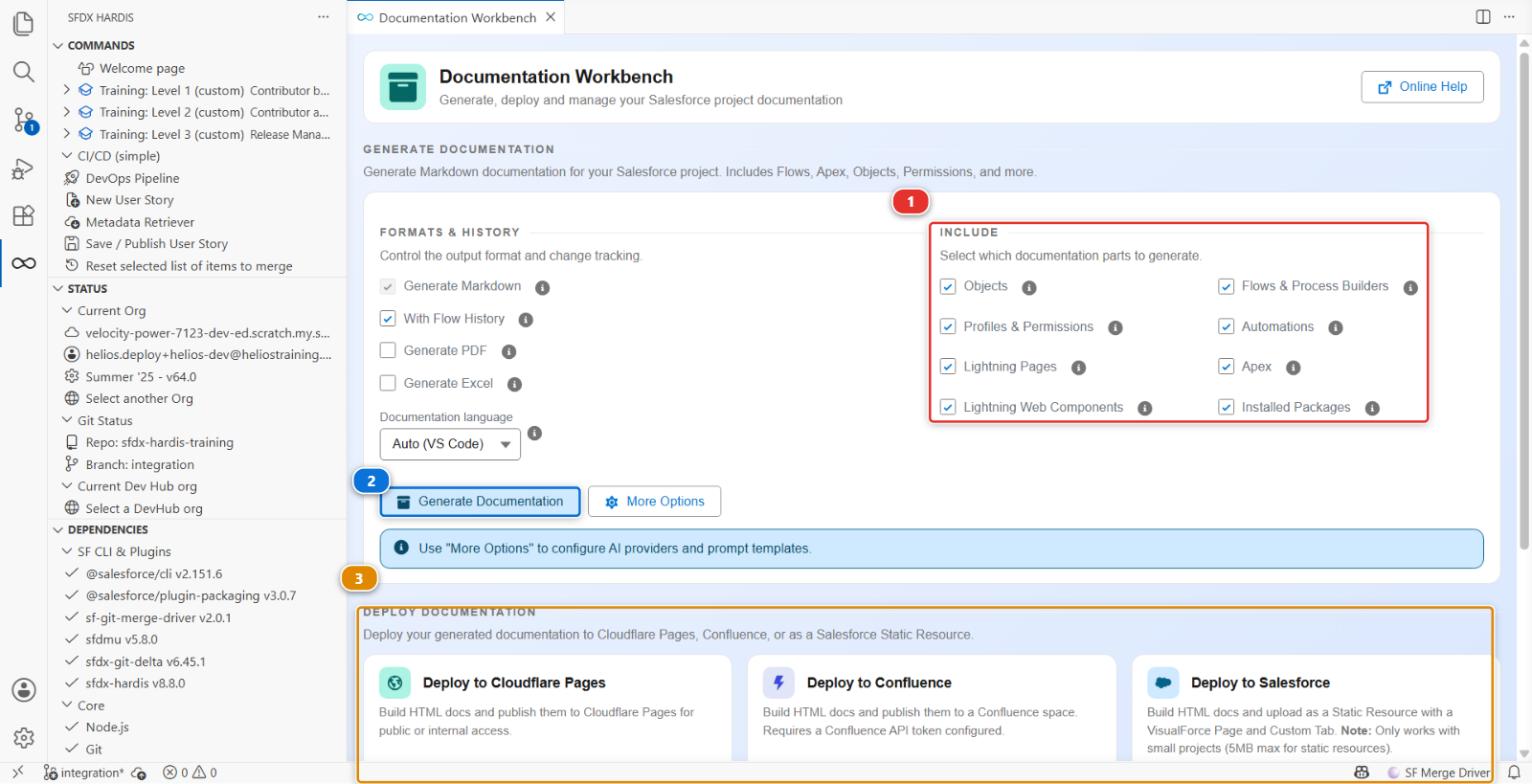
Everything in this lab happens on this one screen. Three parts of it matter:
- Include (1), which decides what gets documented. Eight boxes: Objects, Flows & Process Builders, Profiles & Permissions, Automations, Lightning Pages, Apex, Lightning Web Components and Installed Packages. All ticked is what you want the first time
- Generate Documentation (2), the button that produces the pages
- Deploy Documentation (3), further down, which publishes them
To the left of Include sits a second column, Formats & History. Leave it alone for now, but note that With Flow History is ticked by default. That one checkbox is what step 4 is about, and without it the flow pages have no history diagrams at all.
2. Generate
Click Generate Documentation (2). It reads the sources in force-app/ and produces a set of
markdown pages under docs/.
It takes a few minutes on a small project like Helios.
3. Read what it produced
Four kinds of page, and they are worth knowing apart:
| Page | What it contains | Who reads it |
|---|---|---|
| Object pages | Every field with its type, description and help text, the validation rules, the record types, the relationships | An admin asked to change something |
| Flow pages | A readable diagram of each flow, plus its entry conditions and elements | Anybody who has to understand automation without opening the Flow Builder |
| Apex pages | Classes, their methods, their ApexDoc | A developer |
| Package and profile pages | What is installed, what the permission sets grant | An audit |
Open docs/objects/Installation__c.md. Every field you and your teammates created across three
levels is there, with the descriptions you wrote in Setup.
Fields with no description produce a row with a blank cell. That is the honest output, and it is the argument for the two seconds it takes to fill them in. Look at how many blanks your org has.
4. Look at the flow diagrams
Open the page for Installation_Assign_Crew.
The flow is rendered as a Mermaid diagram: the trigger, the entry conditions, the decisions and their outcomes. It is readable by somebody who has never opened a Salesforce flow, which is most of the people who will ask you what it does.
There is a second thing worth noticing: Installation_Assign_Crew-history.md sits beside it, showing
how the flow changed over time, built from git history. That answers "when did this flow start doing
that", which is otherwise a long afternoon. It exists because With Flow History was ticked, which
passes --with-history to the generator. Untick it and the page is simply not written.
5. Fix the worst gaps by hand
Generated documentation tells you what the org contains. It cannot tell you why.
Spend fifteen minutes adding what only a person can:
- A paragraph at the top of the Installation page saying what an installation is in the business
- One sentence on the scheduler explaining the preparation buffer, which looks arbitrary in code
- A note on the crew capacity cap saying it is a safety rule, not a cost rule
Those three paragraphs are worth more than the other forty pages, and they are the reason this lab exists at the end of a level rather than at the start.
Protect every page you edit. Each generated page starts with two comment lines, and the second
reads <!-- DO_NOT_OVERWRITE_DOC=FALSE -->. Change it to TRUE on the pages you write in. The next
generation leaves a TRUE page alone, and rewrites every other page from the sources, paragraph
included. On a project that commits its documentation, that line is what keeps a person's words
alive across nightly runs.
6. Publish it
The Deploy Documentation section (3) offers three cards, each with the same Deploy button:
- Deploy to Cloudflare Pages publishes it as a site, the way the sfdx-hardis documentation itself is published
- Deploy to Confluence publishes it into a Confluence space, and needs a Confluence API token configured first
- Deploy to Salesforce builds the HTML and uploads it as a static resource, with a Visualforce page and a custom tab, so the documentation is reachable from inside Salesforce. It is capped by the 5 MB static resource limit, so it suits a small project
The same three exist as configuration keys, docDeployToCloudflare, docDeployToConfluence and
docDeployToOrg, which is how the monitoring workflow republishes the documentation every night
without anybody clicking anything. The Cloudflare and Salesforce ones are mutually exclusive: turn
both on and only the Salesforce one runs.
For this lab, generate and read. Publishing is a project decision, and so is committing: this course
keeps docs/ and the generated mkdocs.yml out of git (.gitignore lists them), because they are
rebuilt from the sources whenever anybody asks, and a release manager does not send features, or
their documentation, through Pull Requests of their own.
7. Make it a habit, not an event
Documentation generated once is out of date in a month. The generation is a command, so it can run on a schedule the way the monitoring does, and the monitoring of Lab 3.8 already does it: its nightly backup regenerates the documentation of production before it finishes. Publishing that one, with the keys above, is how a project gets documentation nobody has to remember to update.
Under the hood: what reads what
The command was:
sf hardis:doc:project2markdown
which reads:
- the package directories declared in
sfdx-project.json, soforce-app/: objects, fields, flows, Apex, permission sets, packages manifest/for a page describing the manifests themselvesconfig/.sfdx-hardis.ymlfor the project configuration it documents, which becomesdocs/sfdx-hardis-params.mdanddocs/sfdx-hardis-branches-and-orgs.md- the git history, for the "what changed and when" diagrams, when
--with-historyis passed
and writes markdown under docs/, plus a mkdocs.yml so the result is a site rather than a pile of
files. It does not replace a mkdocs.yml you already have, but it does edit it: it rewrites the
nav block and adds the scripts, styles and theme features the generated pages need. So a
navigation you hand-wrote is rebuilt on the next run, which is worth knowing before you spend an
evening on one.
The flow diagrams are Mermaid, generated from the flow XML. That means they are text in the repository, so they diff, review and version like everything else, and they never go stale relative to the flow they describe.
Two related commands worth knowing:
sf hardis:doc:override-promptslets a project override the AI prompts used when descriptions are generated rather than readsf hardis:doc:plugin:generateis what generates the sfdx-hardis documentation itself, which is a reasonable existence proof that the output is readable
If the project has an AI provider configured, the generator can also write the missing descriptions rather than leaving blanks. Useful, and not a substitute for the three paragraphs in step 5: a model can describe what a field is, not why the business needs it.
What you should see
- A
docs/folder with object, flow and Apex pages docs/objects/Installation__c.mdlisting every field from all three levels- A readable diagram of
Installation_Assign_Crew - Three paragraphs you wrote yourself, on a page marked
DO_NOT_OVERWRITE_DOC=TRUE - Nothing to commit: Source Control shows no change from the generation
If it goes wrong
The generation fails on a flow. A flow with an unusual element can trip the diagram generator. The page is still produced without the diagram. Report it as an issue on sfdx-hardis if you hit one.
The object pages are almost empty. The sources are there but the descriptions are not. That is the org, not the tool.
The docs folder is enormous and the Pull Request is unreviewable. Expected the first time. Say so in the Pull Request description. Subsequent regenerations produce small diffs.
Check your work
Welcome page > Training: Level 3 > Check my work, then pick Lab 3.9.
Go deeper
Next: Lab 3.10 - Capstone: run a weekly release cycle