Lab 3.4 - Three Pull Requests collide: choose the merge order
Level: 3 Release Manager
Time: ~35 min
You will: decide the order three Pull Requests go in, when two of them fight over the same file and one of them does not work.
The situation
Friday afternoon. Three stories carry this week:
| Pull Request | Author | Checks | What it touches |
|---|---|---|---|
| US-018 Cap the crew size | Mariia Pyvovarchuk | green | the assign flow, Helios_Delivery_Manager |
| US-019 Quote PDF | Romain Panda | green | Helios_Delivery_Manager |
| US-020 Refactor InstallationScheduler | Mariia Pyvovarchuk | failing | InstallationScheduler |
Two of them edit the same permission set. One does not deploy. Everyone wants to go home.
Deciding what goes in, in what order, and what waits, is the job.
Before you start
- Lab 3.3 finished
- Nothing uncommitted
Steps
1. Create the Pull Requests you still can
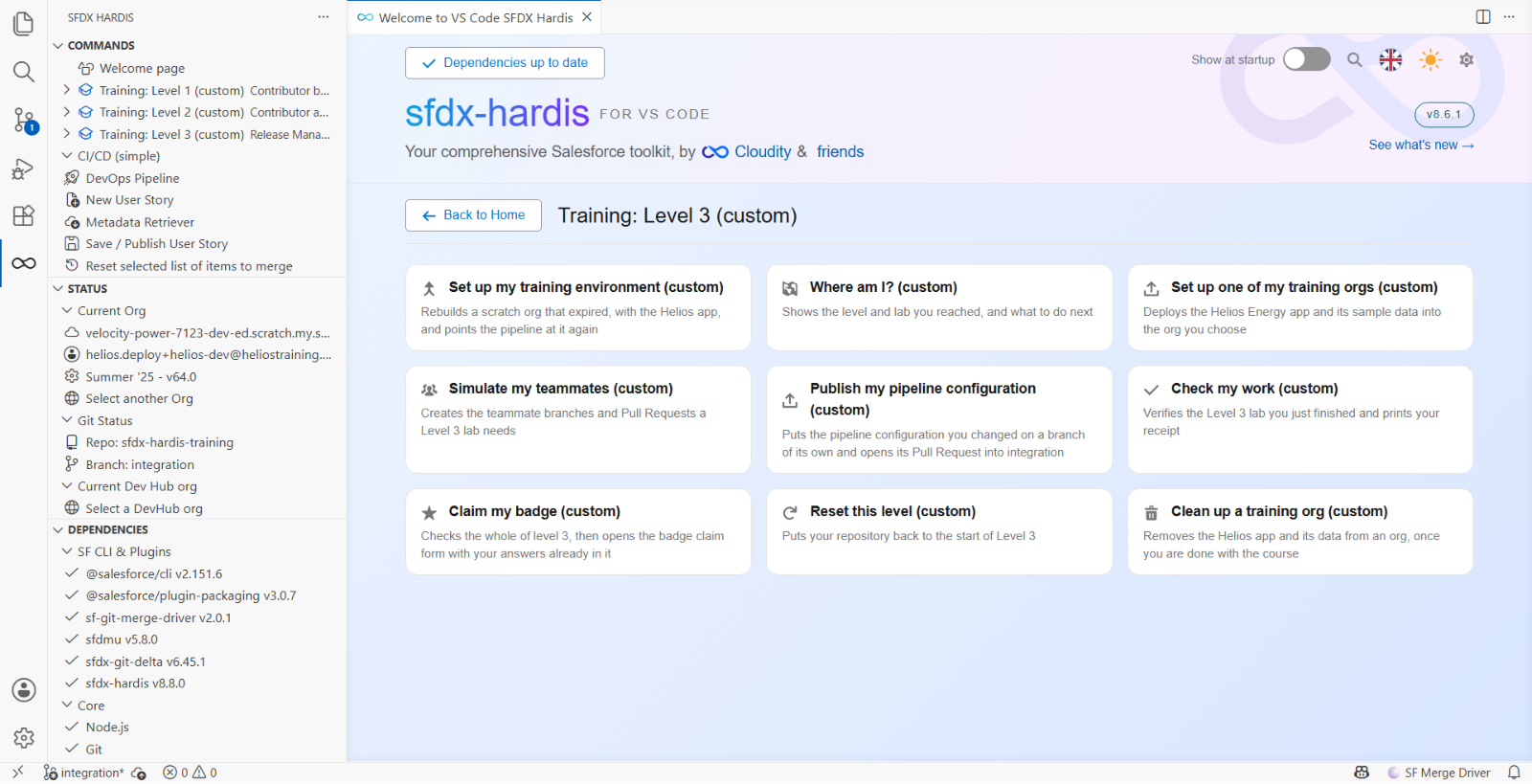
Training: Level 3 > Simulate my teammates, twice: US-020 Refactor InstallationScheduler, and US-019 Generate a quote PDF from an opportunity.
It is on the Welcome page, where each level menu is a page of cards, and in the SFDX HARDIS view of the left bar, where each level is a folder you unfold. Either route runs the same thing:
US-018 is not among them. You merged it in Lab 2.7, and each teammate scenario is used once: replaying one onto a branch that already has its files reports "Nothing to commit" and opens nothing.
US-019 may do the same, and that is not a fault either. It depends on how you got here: the Level 2
capstone merges US-019, so if you walked straight from Level 2 into Level 3 it is already in
integration, and if you reset into Level 3 it is waiting for you. If it reports "Nothing to
commit", open its merged Pull Request instead and read that. Every step below works either way.
Two of the three decisions in this lab may therefore be decisions you already made. Going back over them with a release manager's eyes is cheaper than making them again, and about as useful.
Wait for the checks. US-020's will fail.
2. Triage before you touch anything
Sort the three, in this order of questions:
Which ones are green? A failing Pull Request is not a decision, it is a task for its author. Do not spend your Friday fixing Mariia's refactor.
Which ones touch the same file? US-018 and US-019 both edit Helios_Delivery_Manager. Whichever
merges second inherits whatever the first one did to that file, and step 5 is about what "inherits"
turns out to mean.
Which one is smaller? All else equal, merge the smaller one first. Its author has less to redo if the other one lands badly.
The order you want: US-019 first (small, green, no dependants), then US-018 (green, bigger),
and US-020 goes back to Mariia. Where they are already merged, the Pull Requests tab of the
integration window in the DevOps Pipeline panel lists them in the order they went in, which is the
same question asked backwards.
3. Send US-020 back, properly
Open it and read the failure. It is a genuine failure, in her code, and it is hers to fix.
Read it properly before you write anything, because it is not what the words "failing tests" suggest.
earliestInstallDate now returns a Datetime, and InstallationSchedulerTest still assigns it to a
Date, in two places. The class does not compile, so no test runs at all. What the sfdx-hardis
comment gives you, under Deployment errors, is a compilation error with a class name, twice, not
a failed assertion.
Leave one review comment that does three things:
The check fails to compile
InstallationSchedulerTest:earliestInstallDatereturns aDatetimenow and the test still assigns it to aDate, in two places. No tests ran. Not blocking anything else, so US-019 and US-018 go out in this week's release and this one can land on Monday.
Names the failure, says who owns it, says what happens to the release. Leave the Pull Request open and move on. On a real project you would send it as Request changes. GitHub does not offer that on a Pull Request opened from your own account, and in this fork the teammate Pull Requests are opened from yours, so a plain comment does the job here.
Do not fix a contributor's Pull Request yourself
It is faster once and expensive every time after. The author does not learn the failure, and you become the person every failing check is escalated to.
4. Merge US-019, or read how it went in
Look at its diff on Helios_Delivery_Manager: one new <fieldPermissions> block for
Panel_Batch__c.Quote_Pdf_Url__c, added near the bottom of the file where the Panel_Batch__c
grants live.
Green, small, nothing in its way. Review it the way Lab 3.2 taught, then merge. If it is already merged, read the merged one instead and note how little there was to it.
Nothing here was hard, which is exactly why it is worth knowing what happened next.
5. Find the conflict that never happened
US-018 granted Installation__c.Crew_Capacity_Cap__c, near the top of the same file. US-019 granted
Panel_Batch__c.Quote_Pdf_Url__c, near the bottom. Two people, same file, same week.
Git merged them without a word. No conflict, no resolution, no second look. Open the file on
integration and both grants are there, in order, as if one person had written them.
That is not luck and it is not git being clever. A conflict needs the two edits to land in the same
place, within the few lines of context git compares. These two are about seventy lines apart in an
alphabetically sorted file, so git took both and moved on. Lab 2.7 gave you the other case:
your Crew_Notes__c grant sat one line from Mariia's Crew_Capacity_Cap__c, git could not choose,
and it stopped and asked.
The release manager's takeaway is not "permission sets rarely conflict". It is this:
A silent merge is the common case, and a conflict is the rare one. Git warns you about the rare one. Nothing warns you about the common one, so if you want to know that both grants survived, you have to go and look. That is step 6, and on a real project it is a habit rather than a step.
When git does stop and ask, permission set conflicts are almost always take both: one field each,
and the permission set holds as many as it needs. Resolve it keeping both <fieldPermissions> blocks
in alphabetical order, then wait for the checks to run again. A conflict resolved in the web
editor is a new commit, and it has never been validated. Merging without re-validating is how a
resolution that dropped a closing tag reaches an org.
6. Look at the permission set in the org
In helios-integration, check Helios_Delivery_Manager has both new field permissions:
Crew_Capacity_Cap__c on Installation and Quote_Pdf_Url__c on Panel Batch.
If one is missing, something dropped it between the branch and the org, and the fix is a follow-up Pull Request, not an edit in the org.
7. Understand what kept this survivable, and what is not there
Three mechanisms are worth being able to point at. Open Pipeline Settings from the DevOps Pipeline panel and look at each one, because only the first is actually doing anything here.
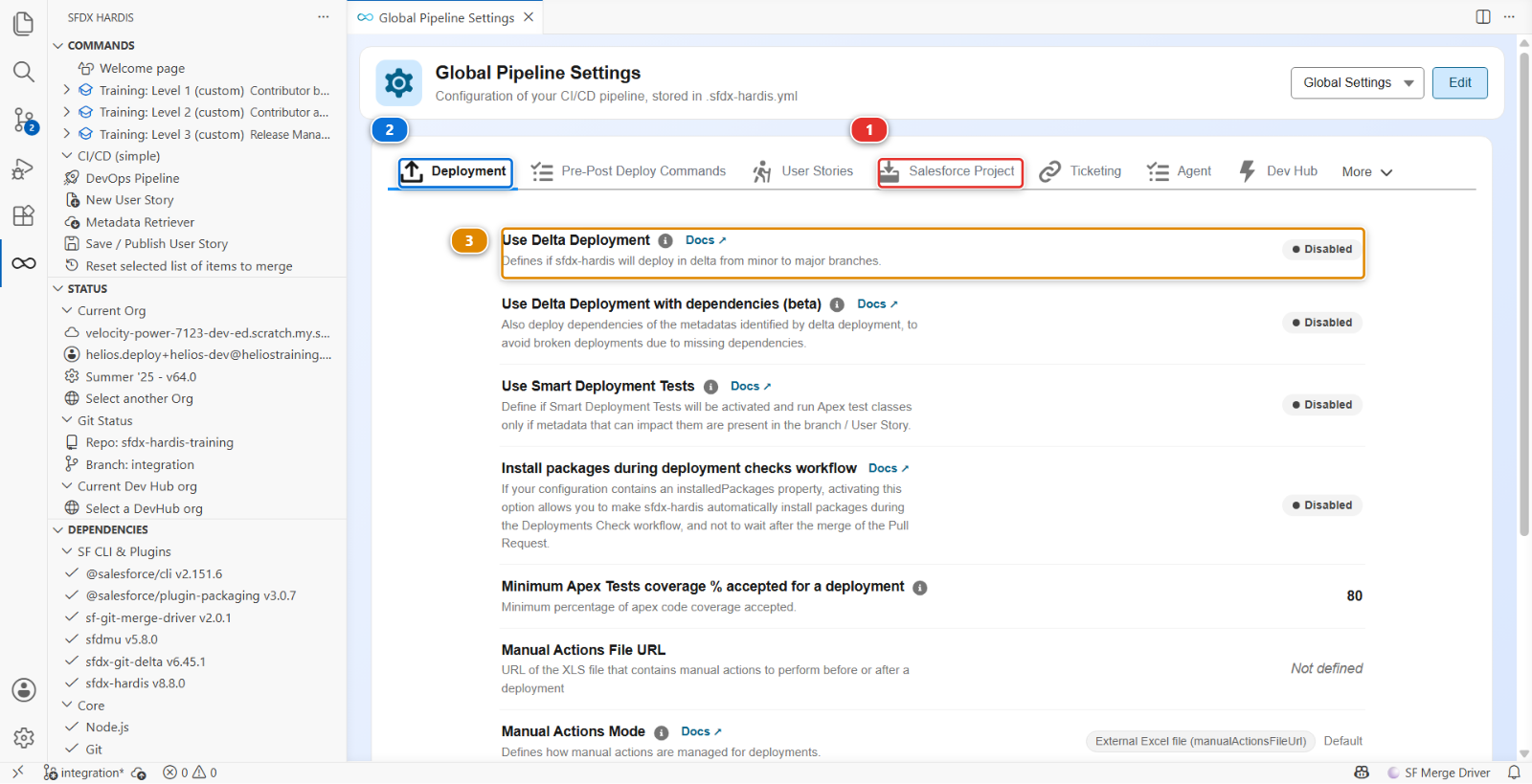
Cleaning (autoCleanTypes, on the Salesforce Project tab (1) of Global Settings) is
on, and it is why these two grants were two small blocks in a permission set rather than two edits
in a thousand-line Profile. A Profile conflict is a bad afternoon. This is most of the reason the
project bans permissions on Profiles.
The overwrite manager (packageNoOverwritePath) protects components that are deliberately
different per org. Anything listed in manifest/package-no-overwrite.xml is removed from the package
when the target org already has it, so a deployment cannot flatten a named credential that points at
a different endpoint in each environment. The file does not exist in this project yet, so nothing is
protected: Lab 3.5 creates it, before the first promotion to uat. Its location can be changed per
branch, which is why you will not find it on the global Deployment tab (2): switch the scope
to Branch: integration and it is there, as Branch-scoped custom Package-No-Overwrite path.
Delta deployment is Use Delta Deployment (3), on the global Deployment tab, and Lab 3.3 showed you it is Disabled here. With it on, each merge deploys the components that changed rather than the declared package. It is a speed and blast-radius decision, not a safety net: it does not stop one merge overwriting another, because both deployments send what their own commit contains.
Under the hood: the three mechanisms and where each one lives
| Mechanism | Configuration | What it does |
|---|---|---|
| Cleaning | autoCleanTypes in config/.sfdx-hardis.yml |
Rewrites the sources at commit time, in the contributor branch |
| Overwrite manager | packageNoOverwritePath plus manifest/package-no-overwrite.xml |
Removes components from the package at deploy time, when the org already has them |
| Delta | useDeltaDeployment |
Reduces the package to what changed since the last deployed commit |
The distinction between the first two is worth keeping straight, because they fail differently.
Cleaning is a source decision: what the repository is allowed to contain. When it drops something, the component is genuinely not in the repository any more, and the diff shows it.
Overwrite is a deployment decision: what this particular org is allowed to receive. The component stays in the repository, and it is simply not sent to an org that already has its own version. A new org, which has nothing, receives it.
That is why a named credential belongs in the overwrite list and not in the cleaning rules: a fresh org must get one, and an existing org must keep its own.
What you should see
- US-019 and US-018 both in the
integrationhistory - US-020 open, with a review that names the compilation error
Helios_Delivery_Managerinhelios-integrationcarrying both grants
If it goes wrong
Simulate my teammates says "Nothing to commit".
That scenario is already in your integration. Expected for US-018 always, and for US-019 when you
came straight from the Level 2 capstone. Read the merged Pull Request instead of recreating it.
One of the two grants is missing from the permission set. Something took one side of the file wholesale, most likely a manual merge during Level 2. Put it back in a follow-up Pull Request, not by editing the org.
Two Pull Requests are waiting and both are green. Merge them one at a time, waiting for each deployment to finish. Merging two at once into the same branch is how a release manager loses an evening.
Check your work
Welcome page > Training: Level 3 > Check my work, then pick Lab 3.4.
Go deeper
Next: Lab 3.5 - Promote to UAT and write the release notes