Level 3 - Salesforce DevOps release manager
Time: about 6 h.
Before you start: Level 1 and Level 2. Both are required, and the badge audit checks both before it looks at anything here.
Why Level 2 is not optional
A release manager reviews other people's deployment errors, deployment actions and conflicts. Those are exactly what Level 2 puts you through. Somebody who has never solved a deployment error cannot judge whether a contributor solved theirs properly, and the reviews they give will be about formatting.
If you skipped Level 2, do it. It is four hours and it is the difference between approving Pull Requests and understanding them.
The story
Victor Squeeker left. He was the release manager, he set the pipeline up two years ago, and he never finished it.
What you inherit works, in the sense that contributors deliver into integration every day and the
business tests in uat. What it does not have:
- No preprod and no production in the pipeline. The branches exist. Nothing deploys to them
- No proper CI authentication. There are two refresh-token secrets somebody added in a hurry
- No monitoring. Nobody finds out about a problem in production until a user calls
- No release notes and no metrics. Nobody can say what shipped last month or how long it took
- No generated documentation. The org is two years old and the only description of it is Victor
Your first week is finishing the pipeline. Then you run it.
The Training menu
Everything this course asks you to run outside the product's own buttons lives in one menu. Open the Welcome page, and under CUSTOM MENUS click the Training: Level 3 card. Its commands take over the page:
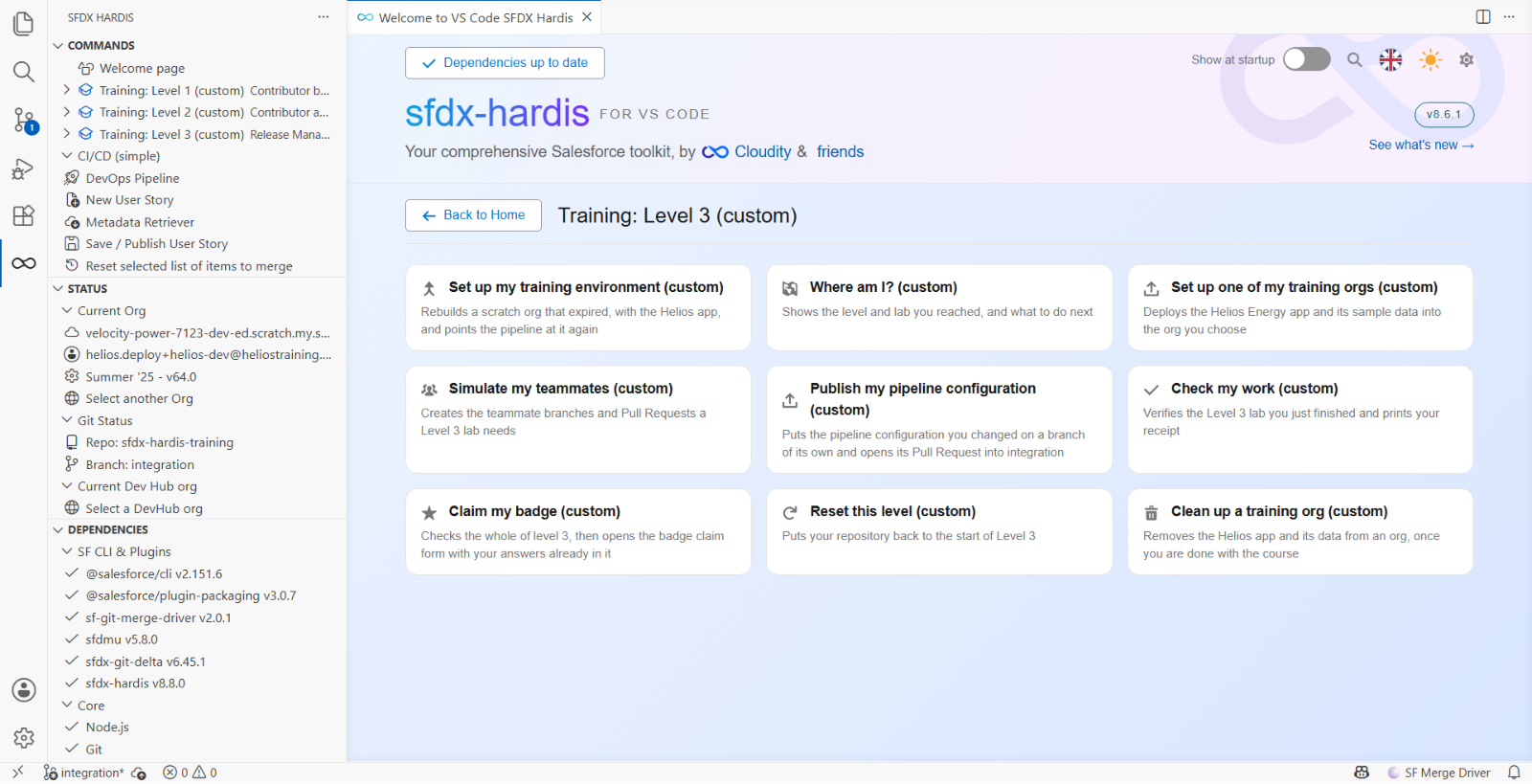
Nine of them, and the labs call them by these names:
| Command | What it does |
|---|---|
| Set up my training environment | Rebuilds a scratch org that expired, and points the pipeline at it |
| Where am I? | Says which level and lab you reached, and what to do next |
| Set up one of my training orgs | Deploys the Helios app and its data into an org you choose |
| Simulate my teammates | Creates the teammate branches and Pull Requests a lab needs |
| Publish my pipeline configuration | Opens a Pull Request into integration with the configuration you changed |
| Check my work | Verifies the lab you just finished and prints your receipt |
| Claim my badge | Checks the whole level, then opens your badge claim filled in |
| Reset this level | Puts your repository back to the start of Level 3 |
| Clean up a training org | Removes the Helios app and its data from an org |
There is one menu per level, and each holds only what that level needs, so nothing in front of you is for a lab you have not reached.
The same commands are in the SFDX HARDIS view of the left bar, under Training: Level 3. Either route runs the same thing.
What you will do
| Lab | Title | Time |
|---|---|---|
| 3.1 | Configure the CI/CD pipeline up to production | 75 min |
| 3.2 | Review and merge a contributor Pull Request | 25 min |
| 3.3 | Read the deployment log, and what .forceignore hides from it | 25 min |
| 3.4 | Three Pull Requests collide: choose the merge order | 35 min |
| 3.5 | Promote to UAT and write the release notes | 35 min |
| 3.6 | Release to production and read your DORA metrics | 35 min |
| 3.7 | Production is broken: hotfix and retrofit | 35 min |
| 3.8 | Monitor your production org | 35 min |
| 3.9 | Generate the Salesforce project documentation | 20 min |
| 3.10 | Capstone: run a weekly release cycle | 45 min |
One more org
Levels 1 and 2 ran on one Developer Edition org, helios-prod, and the three scratch orgs it
created: helios-dev, helios-integration and helios-uat. This level adds production and the
stage before it, and needs one more signup.
Before Lab 3.1, sign up for one more free Developer Edition org at
developer.salesforce.com/signup and connect it in Orgs
Manager with the alias helios-preprod. Then seed both Developer Edition orgs with
Training: Level 3 > Set up one of my training orgs: helios-preprod, and helios-prod, which
until now only created the others and held nothing.
helios-prod gets the same sources as the other orgs. Nothing seeds a deployment history, so the
DORA report in Lab 3.6 sees only the seeding and the deployments you make yourself.
If a scratch org expired since Level 2, Training: Level 3 > Set up my training environment rebuilds it first.
Your role changes
In Levels 1 and 2 you built User Stories and opened their Pull Requests. A release manager does
not. Your teammates open the Pull Requests, Simulate my teammates plays them, and you review
them, merge them or send them back. What you create yourself is the pipeline: its configuration,
which Publish my pipeline configuration sends to integration through a Pull Request, and the promotions from one major
branch to the next, integration to uat, uat to preprod, preprod to main.